

Documentation · Revolutionary Importer 0.9.8
Revolutionary Importer, step by step.
How to import data from the plugins you use today, and how to connect an existing WordPress site and rebuild it with Revolutionary.
Released version 0.9.6
Current release setup and checks
Import supported plugin data or move a site using the migration workflow.
- Choose the importer for the source plugin and inspect its preview before importing.
- Whole-site migration uses the migration agent and connection details shown by the tool.
- The SEO importer also reads SEOPress and All in One SEO data. The WP-CLI command wp rimp list shows each importer and the detected sources, and wp rimp run runs an import with the same results and entitlement check as the dashboard.
Check your setup
- Back up the destination before an import or migration.
- Check the transferred records, media and links on the destination before retiring the source.
Watch the walkthrough
Import sample SEO metadata without overwriting existing destination data
Import fictional saved Yoast SEO metadata into Revolutionary SEO using Revolutionary Importer. Keep overwrite disabled and compare the original and destination fields. No remote connection or migration key is used.
Recording release: 0.9.4. Captured on an isolated demonstration site.
Chapters
Quick start
Up and running in minutes
Step 1
Install and activate
Upload revolutionary-importer-0.9.8.zip under Plugins, Add New, Upload Plugin, and activate it. Open Revolutionary Plugins, Importer.
Step 2
License or trial
Activate your license in Multipurpose Dashboard, Welcome, or click Start free trial on the Importer screen and enter an email.
Step 3
Import from a plugin
Find the card for your old plugin, install the matching Revolutionary plugin if needed, and click Import.
Step 4
Or migrate a site
Use the Connect a site panel to link an existing WordPress site and rebuild it here.
On this page
Start here
Where everything lives
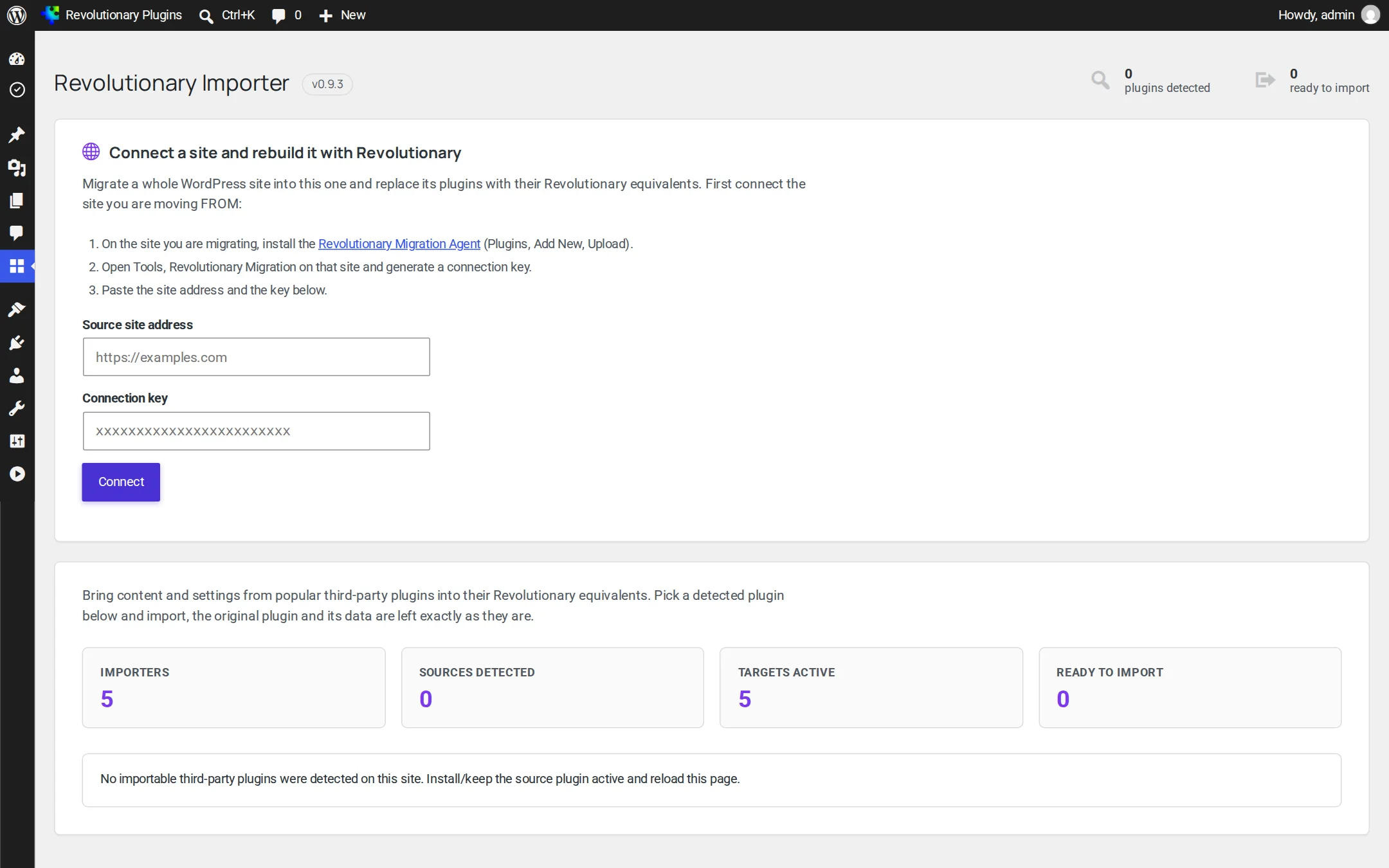
The Importer is one screen under Revolutionary Plugins, Importer. From top to bottom: the license and trial bar, the Connect a site panel, a row of stats, and one card per importer. You need the manage_options capability.
License or trial
Running imports, installing Revolutionary plugins and starting a migration need an active license or trial. Your license key is entered once for the whole suite in Multipurpose Dashboard, Welcome. Without the theme, click Start free trial and enter an email to get 7 days for this site. Reinstalling the plugin does not reset the trial.
The stats row
| Stat | What it counts |
|---|---|
| Importers | Importer cards available |
| Sources detected | Supported source plugins that are active on this site |
| Targets active | Matching Revolutionary plugins that are active |
| Ready to import | Importers with both a source and a target in place |
Plugin to plugin
Importing from a plugin on this site
The source plugin must be active on this site so the Importer can detect it. Its data is only read, never changed.
- 1. Find the card for the kind of data you want to move (SEO, Forms, Sliders, Testimonials or SMTP).
- 2. If the Revolutionary plugin is missing, click Install on the card.
- 3. Tick Overwrite existing data only if you want to refresh items that were already imported.
- 4. Click Import and read the result on the card.
| Importer | Sources | Imports into |
|---|---|---|
| SEO | Yoast SEO, Rank Math, SEOPress, All in One SEO | Revolutionary SEO |
| Forms | Contact Form 7, WPForms Lite and Pro | Revolutionary Forms |
| Sliders | MetaSlider, Soliloquy | Revolutionary Slider |
| Testimonials | Strong Testimonials, Easy Testimonials, Jetpack Testimonials | Revolutionary Testimonials |
| SMTP | WP Mail SMTP, Easy WP SMTP, Post SMTP | Revolutionary SMTP |
Plugin to plugin
What each importer moves
What comes across, and what you will set up by hand.
SEO
Moves per-post meta title, meta description, focus keyword, canonical URL, noindex and nofollow, Open Graph and Twitter title, description and image, plus the Twitter username, default share image, Facebook URL and title separator. Template tokens are turned into plain text.
- Not moved: schema, breadcrumbs, sitemap settings, redirects and per-category SEO.
- Rank Math: only the first focus keyword comes across.
Forms
Moves fields and choices, the submit label, the admin notification and the confirmation message.
- Not moved: conditional logic, calculations, payments, multi-page steps and CAPTCHA settings.
Sliders
Moves each slide's image, heading, caption and button, plus slider settings.
- Not moved: custom CSS, animations, video slides and advanced layer styling. Slides use a single hero layout.
Testimonials
Moves the client name, quote and photo from all three sources, plus email, company, website, rating and categories where the source stores them.
- Company logos are not imported, because none of the sources store one the Importer can read.
SMTP
Creates a Custom SMTP connection with host, port, encryption, authentication, username and From details.
- Passwords stored encrypted or in a constant come across blank. Re-enter them in Revolutionary SMTP.
- OAuth and API mailers (Gmail API, Microsoft 365 API, SendGrid API, Mailgun API) are not transferred.
Site to site
Migrating a whole site
Use the Connect a site and rebuild it with Revolutionary panel to copy an existing WordPress site into this one.
- 1. In the Connect panel, download the Revolutionary Migration Agent and install it on the old site like any plugin.
- 2. On the old site, open Tools, Revolutionary Migration and generate a connection key.
- 3. Back here, enter the old site's address and paste the key, then click Connect and Scan source site.
- 4. Review the plan: the plugins that will be replaced and the ones with no Revolutionary equivalent. Tick Skip content or Skip menus if you want, then click Start migration.
- 5. Watch the progress bar and log. The migration runs in small batches and picks up where it left off.
After the migration
- Assign roles to imported users. Authors arrive as Subscribers and passwords are never copied.
- Check the header and footer.
- On the old site, revoke the key and deactivate the agent. Deactivating it also removes the key.
Site to site
What a migration carries over
Running the migration again updates items in place instead of duplicating them.
| Area | What comes across |
|---|---|
| Plugins | Revolutionary replacements are installed for plugins the Importer recognizes |
| Content | Posts, pages, custom post types, post meta, categories and tags |
| People | Authors, created as Subscribers |
| Media | Featured images, in-content images and images on CDNs or other domains. Media already in your library is reused. |
| Links | Addresses pointing at the old site are rewritten to the new one |
| Page builder | Elementor pages become Revolutionary Blocks. Testimonial carousels become Testimonials and info boxes become Image Boxes. |
| Menus | Navigation menus, assigned to locations by intent (header to primary, footer to footer) |
| Identity | Site title, tagline, front page, posts page, logo and site icon |
| Design | Fonts and brand colors |
| Header and footer | From Elementor Pro theme templates, or read from the home page of themes like OceanWP and Astra |
Security
About the migration agent
The Revolutionary Migration Agent is a single-file plugin you install on the old site only for the migration.
- It only reads. It never writes to the old site.
- Every request needs the connection key you generate at Tools, Revolutionary Migration. Revoke the key there at any time.
- It never asks for the old site's admin password.
- Deactivating the agent deletes its key.
Hooks
For developers
Two filters let you extend the Importer. On the command line, wp rimp list shows every importer, its target and the source plugins detected on the site, and wp rimp run <importer> --source=<slug> runs an import with the same results and license or trial check as the dashboard. There are no shortcodes or blocks.
| Hook | What it does |
|---|---|
rimp_importers | Register your own importer card |
rimp_plan_replacements | Add plugins to the migration plan's replacement map |
Troubleshooting
Common questions
The agent on the old site is inactive, or the key was revoked. Generate a fresh key and connect again.
The source plugin must be active on this site to be detected. For whole-site moves, use Connect a site instead.
That step needs Revolutionary Blocks active and a Revolutionary theme. Without them it is skipped.
The SEO importer reads it directly: per-post titles, descriptions, focus keyphrase, canonical, robots, Open Graph and Twitter fields, with its smart tags resolved. A site migration also recognizes it and installs Revolutionary SEO.
Installs, imports and migrations pause until a license is active. Everything already imported stays where it is.
Stuck on something?
Search the forums, open a ticket, or write to us. A real person reads every message.